
A supported image
Use one JPG, PNG, or WebP no larger than 10 MB. Keep the person, legs, and both shoes fully inside the frame.
Practical photo-to-dance guide
Use this checklist to choose a better source image, direct the setting without overwriting the built-in movement, pick the right resolution, and handle common generation problems.
1 full-body photo
5-second 9:16 MP4
480P or 768P
Before you start
The generator is intentionally focused. It accepts one reference image and uses a built-in tip-toe movement, so input quality matters more than a long choreography prompt.
Use one JPG, PNG, or WebP no larger than 10 MB. Keep the person, legs, and both shoes fully inside the frame.
Plan a location, lighting style, camera direction, and mood. The prompt can be up to 600 characters.
Only upload an adult you have the right and informed permission to depict in an AI-generated video. Images of minors are prohibited.
Step by step
These steps match the live generator and its current five-second vertical output.
Open the generatorUse an upright subject with the entire body and both shoes visible. Even lighting, a simple background, and one main person give the model clearer visual information.
Open the generator and select your JPG, PNG, or WebP. Confirm that the preview is not cropped and that the file is within the 10 MB limit.
Write a compact prompt for the location, lighting, framing, camera movement, and mood. The core tip-toe movement is already included, so you do not need to choreograph every step.
Use 480P for a one-credit draft or 768P for a sharper two-credit render. Confirm the rights and adult-consent checkbox before submitting.
Generation runs asynchronously and can take longer when providers are busy. When it succeeds, review the five-second MP4 and download it before the signed result link expires after 24 hours.
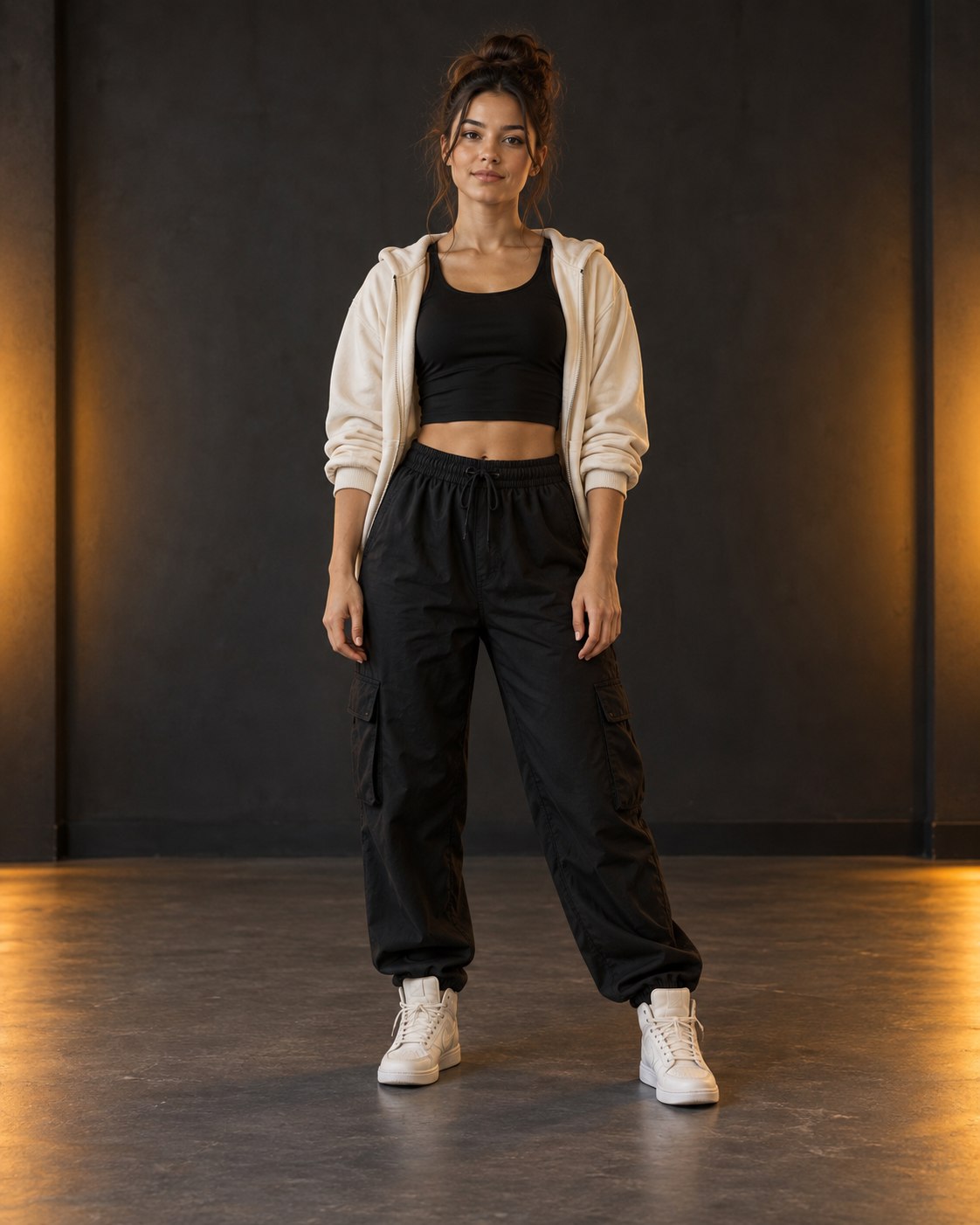 Example input
Photo checklist
A clean source photo cannot guarantee a perfect result, but it removes common sources of confusion before the video model starts.
Prompt method
A useful formula is: place + lighting + camera + mood. Keep directions compatible and concrete; the built-in instruction already guides the central movement.
Prompt formula
Place + lighting + camera movement + mood
“Minimal white studio, soft floor shadow, centered camera, clean commercial lighting.”
“Neon-lit sneaker walkway, low tracking camera, orange and violet light, playful confident mood.”
“Blue-hour rooftop, slow camera push, glowing skyline behind the subject, cinematic contrast.”
Do not ask for several incompatible locations or rapid scene changes in a five-second clip. Short, coherent direction is easier to interpret.
Resolution choice
Both options create the same five-second, 9:16 MP4 format. The difference is resolution and credit cost.
Fast drafts and testing a source photo
Start here when you want to check motion, framing, and prompt direction with the lower credit cost.
A sharper export after the setup is ready
Choose this when the source photo and direction are settled and you want more detail in the final MP4.
Troubleshooting
AI video is probabilistic, so no adjustment guarantees a particular result. These checks address the most common input problems.
Use a wider full-body source image with both shoes separated from the frame edge and clearly visible.
Try a sharper, evenly lit photo with fewer obstructions and a simpler background. Avoid tiny faces or strong blur.
Remove conflicting instructions. Keep one location, one lighting idea, one camera direction, and one mood.
Wait for the status to finish before retrying. A failed generation is designed to return the credits reserved for that job automatically.
Signed result links expire after 24 hours. Download successful MP4 files promptly rather than treating the service as permanent storage.
Before publishing
The downloaded MP4 is a visual source. A specific song is not promised, and you remain responsible for how the video is edited and published.
Guide FAQ
No. The current generator accepts one still JPG, PNG, or WebP and uses a built-in instruction for the central tip-toe movement.
The prompt is optional and limited to 600 characters. A short, coherent description of place, lighting, camera, and mood is usually more useful than a list of conflicting ideas.
480P costs 1 credit and is useful for a draft. 768P costs 2 credits and is better when you want a sharper render after the photo and prompt are ready.
Generation is asynchronous and often takes minutes, but there is no fixed completion-time guarantee. Provider demand and the individual job can affect the wait.
A specific song or soundtrack is not promised. Only add audio that you have the right to use where you publish the video.
A failed job is designed to return the credits reserved for that generation automatically. A successfully produced video is not refundable only because you dislike its appearance.
Ready to use the checklist?
Open the live generator, upload an eligible adult photo, and choose 480P or 768P when you are ready to render.
Tip Toe in My Jordans Video Generator is an independent creative tool and is not affiliated with, endorsed by, or sponsored by Nike, Inc. or Jordan Brand. Users are responsible for all necessary image, music, publicity, and publishing rights.